Sunday, 27 May 2012

PHOTO SCAPE

PhotoScape is a photo editing software that is easy and fun. These applications can be used by beginners to improve and enhance the image display. This application also serves as a viewer, to see the photos and slideshow.

Key Features
  • Viewer: View photos in your folder, create a slideshow
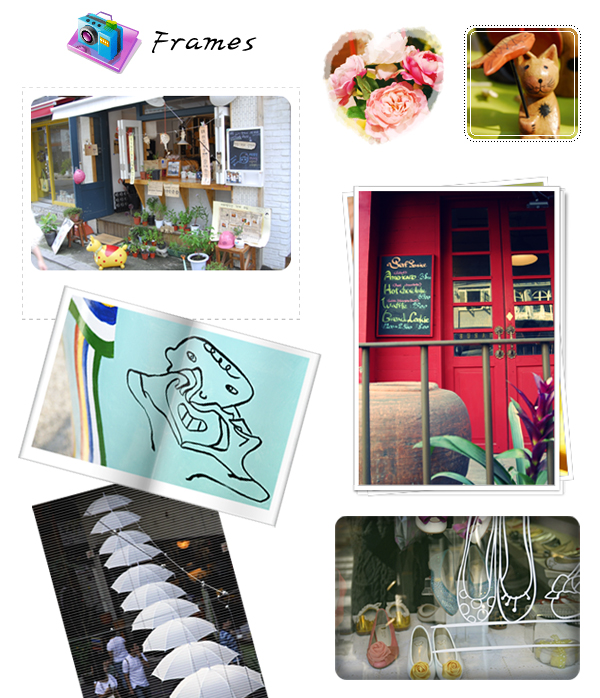
  • Editor: resizing, brightness and color adjustment, white balance, backlight correction, frames, balloons, mosaic mode, adding text, drawing pictures, cropping, filters, red eye removal, blooming, paint brush, clone stamp, effect brush
  • Batch editor: Batch edit multiple photos
  • Page: Merge multiple photos on the page frame to create one final photo
  • Combine: Attach multiple photos vertically or horizontally to create one final photo
  • Animated GIF: Use multiple photos to create a final animated photo
  • Print: Print portrait shots, carte de visites(CDV), passport photos
  • Splitter: Slice a photo into several pieces
  • Screen Capture: Capture your screenshot and save it
  • Color Picker: Zoom in on images, search and pick a color
  • Rename: Change photo file names in batch mode
  • Raw Converter: Convert RAW to JPG
  • Paper Print: Print lined, graph, music and calendar paper
  • Face Search: Find similar faces on the Internet.
CLICK HERE TO DOWNLOAD

Thursday, 24 May 2012

DOWNLOAD WINDOWS 8 CONSUMER PREVIEW

DOWNLOAD WINDOWS 8 CONSUMER PREVIEW


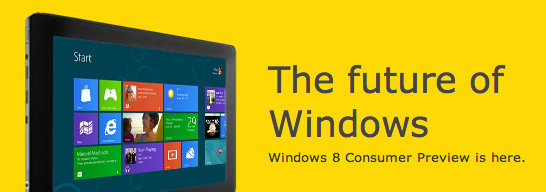
It's Windows reimagined and reinvented from a solid core of Windows 7 speed and reliability. It's an all-new touch interface. It's a new Windows for new devices. And it's your chance to be one of the first to try it out.
Windows 8 Consumer Preview is a much refined and faster beta version that brings quite a lot of new stuff to the table. Firstly, the old Start button has been removed and is now replaced by a Charms Bar that appears on the right side of the screen. To reveal the Charms Bar, you’ll either have to point to the top or bottom left corner of the tablet or desktop/laptop. It also brings the new and simplified Windows 8 logo, some new apps and a handful of other bug fixes and performance improvements.

DOWNLOAD 32bit

DOWNLOAD 64bit

Product Key:   DNJXJ-7XBW8-2378T-X22TX-BKG7J

In case you want the windows 8 consumer preview in any other language the goto the windows official download page then click here.

don't forget to share nd subscribe my posts.............


TUNEUP UTILITIES 2012 FULL VERSION FREE DOWNLOAD


TuneUp Utilities provide amazing speed boost to your computer deleting all the temporary files and clutter in your computer. TuneUp Utilities provide easy user interface which you can use to maintain your computer. With TuneUp Utilities you can disable effects and other heavy stuff which will help you to boost overall speed and performance of your PC.


DOWNLOAD HERE

Tuesday, 22 May 2012

WINDOWS 7 KEYBOARD SHORTCUTS

HY FRIENDS,
                   TODAY I AM GOING TO TELL YOU SOME SHORTCUTS FOR WINDOWS 7 WHICH ARE REALLY IMPRESSING YOU AS WELL AS YOUR FRIENDS.
                          Anyone working professionally with a computer has their hands on the keyboard most of the time. Reaching for the mouse can be an annoying disturbance and personally I often turn over my mouse in such situations. An easy solution is to simply keep the hands on the keyboard and complete as many tasks as possible with keyboard shortcuts only.
                                 IT MAKES YOUR WORK MORE EFFICIENT AND FASTER.
 Note that some of these shortcuts will only work if Windows Aero is enabled. If Aero effects are disabled on your computer, it might not be powerful enough to support resource intensive graphical features. 


AERO SHORTCUTS


      • [Windows] + [Spacebar] (Aero Peek)
        Make all open windows transparent to view gadgets and icons on desktop.
      • [Windows] + [D] (Aero Peek)
        Show or hide the desktop.
      • [Windows] + [Home] (Aero Shake)
        Minimize all but selected window. Reverse by clicking the key combination again.
      • [Windows] + left arrow OR [Windows] + right arrow (Aero Snap)
        Dock selected window to the left or right half of your screen.
      • [Windows] + up arrow OR [Windows] + down arrow (Aero Snap)
        Maximized and restores the selected window.
      • [Windows] + [SHIFT] + up arrow OR [Windows] + [SHIFT] + down arrow (Aero Snap)
        Maximizes and restores selected window in vertical dimension only.
      • [Windows] + [Tab] (Aero Flip)
        Launch 3D representation of open windows and click [Tab] key again to flip through them.

     WINDOWS & TASKBAR


      • [Alt] + [Ctrl] + [Tag] + left/right/up/down arrow
        Flip window.
      • [Alt] + [Tab]
        Cycle through open windows
      • [Windows] + [T] OR [Windows] + [SHIFT] + [T]
        Move focus to front or back of taskbar. Press [T] again while holding the [Windows] key to cycle through items in the taskbar from left to right or, with [SHIFT] button held too, from right to left.
      • [Windows] + [B]
        Puts focus on the ‘show hidden icons’ button on the system tray.
      • [Windows] + [1] THROUGH [Windows] + [9]
        Launch first through ninth icon on taskbar, including items pinned to taskbar.
      • [Windows] + [SHIFT] + [1] THROUGH [Windows] + [SHIFT] + [9]
        Starts new instance of respective taskbar icon.
      • [Windows] + [Ctrl] + [1] THROUGH [Windows] + [Ctrl] + [9]
        Cycles through multiple instances of the respective icon.
      • [Windows] + [Alt] + [1] THROUGH [Windows] + [Alt] + [9]
        Opens jump list for respective icon.  

     MULTIPLE MONITORS

      • [Windows] + [SHIFT] + right arrow OR [Windows] + [SHIFT] + left arrow
        Move selected window from one monitor to another. They will remain in the same relative location.
      • [Windows] + [P]
        Select presentation display mode.                                                                                                                                


    MAGNIFIER

      • [Windows] + [+] OR [Windows] + [-]
        Activates Windows Magnifier to zoom in or out of screen.
      • [Ctrl] + [Alt] + [D]
        Switch to docked mode.
      • [Ctrl] + [Alt] + [L]
        Switch to lense mode.


      • Ctrl] + [Alt] + [F]
        Switch from docked or lens mode back to full screen mode.
      • [Ctrl] + [Alt] + [I]
        Invert colors.
      • [Windows] + [Esc]
        Exist magnifier views.             

     SOME OTHERS


        • [Windows] + [G]
          Cycle through desktop gadgets.
        • [Windows] + [X]
          Launches Windows Mobility Center. Especially useful if you’re working on a laptop.   

    Monday, 23 April 2012

    Windows XP SP3 Diamond Ultimate

    Windows XP SP3 Diamond Ultimate

    HY GUYS !!
    IT IS AN MODIFIED XP SP3 WINDOWS ....................
    THIS VERY GOOD LOOKING AS WELL AS FAST FOR WORKING!!
    PLS TRY IT AND GIVE YOUR REVIEWS.

    File: Windows Diamond Ultimate.iso
    Size : 650MB
    CRC-32: 164eba01
    MD4: abb80581070f7ce3d2c3148b392a95f3
    MD5: 9e42576cedc2e5edfbedc91231496530
    SHA-1: 38738a373be97d3ecefffe79aff4fab0be17ddb4

    SOFTWARE INCLUDED IN THIS WINDOWS PACKAGE ARE:-----
    Mozilla Firefox v3.5.2 + Plugins
    WinRAR v3.9.5 Plus (10 Theme)
    Shock 4 Way 3D v1.29
    Diamond Circle Dock v0.92
    Diamond Click star 2 v1.0.5e
    Diamond ViStart v2.0
    Diamond Sidebar v4.0
    Diamond Rocket Dock v1.3.5
    Diamond Drive Icon v1.4
    Diamond Sceen Savers v4.0
    Diamond Cursors AIO v1.9
    Diamond TrueTransparency v1.0
    Diamond Superbar v1.0.0.1182[/COLOR]
      
    TO DOWNLOAD LINKS ARE GIVEN BELOW:------


    GUYS I HOPE YOU  LIKED IT..........
    PLS COMMENTS !!!!